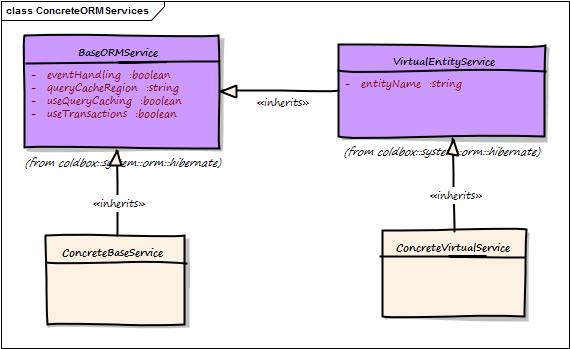
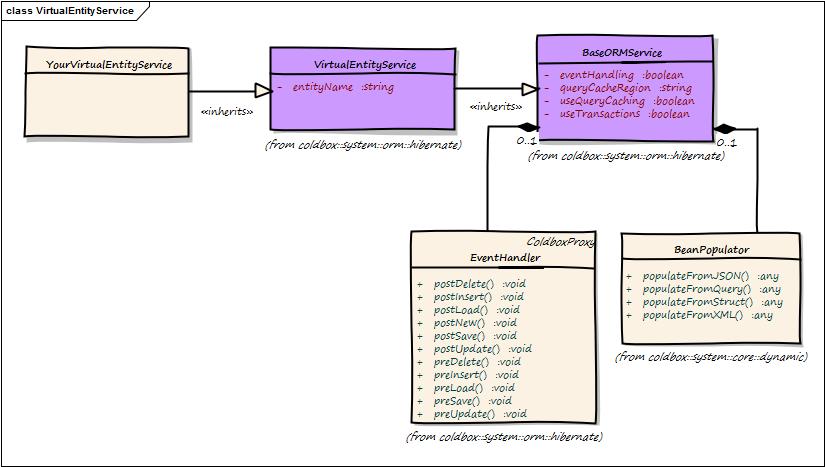
Loading...
Loading...
Loading...
Loading...
Loading...
Loading...
Loading...
Loading...
Loading...
Loading...
Loading...
Loading...
Loading...
Loading...
Loading...
Loading...
Loading...
Loading...
Loading...
Loading...
Loading...
Loading...
Loading...
Loading...
Loading...
Loading...
Loading...
Loading...
Loading...
Loading...
Loading...
Loading...
Loading...
Loading...
Loading...
Loading...
Loading...
Loading...
Loading...
Loading...
Loading...
Loading...
Loading...
Loading...
Loading...
Loading...
Loading...
Loading...
Loading...
Loading...
Loading...
Loading...
Loading...
Loading...
Loading...
Loading...
Loading...
Loading...
Loading...
Loading...
Loading...
Loading...
Loading...
Loading...
Loading...
Loading...
Loading...
Loading...
Loading...
Loading...
Loading...
Loading...
Loading...
Loading...
Loading...
Loading...
Loading...
Loading...
Loading...
Loading...
Loading...
Loading...
Loading...
Loading...
Loading...
Loading...
Loading...
Loading...
Loading...
Loading...
Loading...
Loading...
Loading...
Loading...
Loading...
August 10, 2022
New when( boolean, success, fail ) fluent construct for ActiveEntity, VirtualEntityService and the BaseORMService to allow for fluent chaining of operations on an entity or its service.
Migration to new ColdBox Virtual App Testing approaches
Removed unnecessary on load logging to increase performance
Hibernate 5.4 on Lucee experimental testing
countWhere() invalid SQL exception if no arguments are provided:
In this section you will find the release notes for each version we release under this major version. If you are looking for the release notes of previous major versions use the version switcher at the top left of this documentation book. Here is a breakdown of our major version releases.
A complete rewrite of the module to support a more modern and fluent approach to working with Hibernate/ColdFusion ORM. In this release we had to support 3 versions of Hibernate: 3 (Lucee), 4 (ACF 2016) and 5 (ACF 2018), which in itself proved to be a gargantuan task.
We also focused on bringing more functional programming aspects to working with collections of entities and even introduced cbStreams as part of the cborm module. This gives you the ability to produce streams out of any method that produces a collection of entities.
We also focused on converting the state of an object graph to a raw ColdFusion data struct as we live in the world of APIs. We include the mementifier module which allows every single entity to have a getMemento() method that will convert itself and its relationships to raw CF data constructs so you can take that state and either marshall it to another format (json,xml,excel) or audit the state.
The first version of the cbORM series that focused on expanding the native ColdFusion ORM methods and exposing much more Hibernate functionality to the CFML world.
ColdBox ORM Module
The cborm module is a module that will enhance your experience when working with the ColdFusion ORM powered by Hibernate. It will not only enhance it with dynamic goodness but give you a fluent and human approach to working with Hibernate. Basically making working with Hibernate not SUCK!
Service Layers with all the methods you could probably think off to help you get started in any project
Virtual service layers so you can create virtual services for any entity in your application
Automatic RESTFul resources handler, focus on your domain objects and business logic, not the boilerplate of REST
ActiveEntity our implementation of Active Record for ORM
Fluent queries via Hibernate's criteria and detached criteria queries with some Dynamic CFML goodness
Automatic transaction demarcation for save and delete operations
Dynamic finders and counters for expressive and fluent shorthand SQL
Automatic Java casting
Entity population from json, structs, xml, and queryies including building up their relationships
Entity validation via
Includes the to produce memento states from any entity, great for producing JSON
Ability for finders and queries to be returned as Java streams using our project.
In other words, it makes using an ORM not SUCK!
The ColdBox ORM Module is maintained under the guidelines as much as possible.Releases will be numbered with the following format:
And constructed with the following guidelines:
Breaking backward compatibility bumps the major (and resets the minor and patch)
New additions without breaking backward compatibility bumps the minor (and resets the patch)
Bug fixes and misc changes bumps the patch
Apache 2 License:
Code:
Issues:
ForgeBox:
The Ortus Community is the way to get any type of help for our entire platform and modules:
The ColdBox ORM Module is a professional open source software backed by offering services like:
Custom Development
Professional Support & Mentoring
Training
Server Tuning
Because of His grace, this project exists. If you don't like this, then don't read it, it's not for you.
"Therefore being justified by faith, we have peace with God through our Lord Jesus Christ: By whom also we have access by faith into this grace wherein we stand, and rejoice in hope of the glory of God." Romans 5:5
These methods allow you to delete one or more entities in cascade style or bulk styles.
These methods allow you to create entities and populate them from external data like structures, json, xml, queries and much more.
Security Hardening
Code Reviews
# A quick preview of some functionality

var book = new Book().findByTitle( "My Awesome Book" );
var book = new Book().getOrFail( 2 );
new Book().getOrFail( 4 ).delete();
new Book().deleteWhere( isActive:false, isPublished:false );

property name="userService" inject="entityService:User";

return userService.list();
return userService.list( asStream=true );

var count = userService.countWhere( age:20, isActive:true );
var users = userService.findAllByLastLoginBetween( "01/01/2019", "05/01/2019" );

userService
    .newCriteria()
    .eq( "name", "luis" )
    .isTrue( "isActive" )
    .getOrFail();

userService
    .newCriteria()
    .isTrue( "isActive" )
    .joinTo( "role" )
        .eq( "name", "admin" )
    .asStream()
    .list();

userService
    .newCriteria()
    .withProjections( property="id,fname:firstName,lname:lastName,age" )
    .isTrue( "isActive" )
    .joinTo( "role" )
        .eq( "name", "admin" )
    .asStruct()
.list();<major>.<minor>.<patch>Renamed default object DSL
April 27, 2021
New eventPrefix setting so you can prefix the resource REST CRUD events with whatever you like.
Useful exceptions when results struct does not have the required keys
Ability to override the name of the method to use for persistence on the ORM services. Using the variables.saveMethod property or the savemethod argument.
Ability to override the name of the method to use for deleting entities on the ORM services. Using the variables.deleteMethod property or the deleteMethod argument.
cbSwagger docs added to the base resource handler
Added ACF2016 compatibilities on elvis operator which sucks on ACF2016
Avoid using member function son some arrays to allow for working with Java arrays
These methods allows you to tap into the Criteria Queries API so you can do fluent and functional queries with your ORM objects.
Finders are convenience methods that will help you find a single entity or a collection of entities by using criterias. If you want to use primary keys, then use the getters.
These methods are used for doing a-la-carte querying of entities with extra pizzaz!
These methods allow you to do counting on entities with or without filtering.
Here is a collection of useful getter methods for entities by primary identifiers. Getters mostly deal with retrieving entities by primary keys instead of finders which rely on criteria operations. You can use the get() for a single entity, getOrFail() for throwing exceptions if an entity is not found and getAll() for multiple entities.
r = categoryCriteria
.withProjections(
	groupProperty = "catid",
	sqlProjection = [
		{
			sql      : "count( category_id )",
			alias    : "count",
			property : "catid"
		}
	],
	sqlGroupProjection = [
		{
			sql      : "year( modifydate )",
			group    : "year( modifydate )",
			alias    : "modifiedDate",
			property : "id"
		},
		{
			sql      : "dateDiff('2021-12-31 23:59:59','2021-12-30')",
			group    : "dateDiff('2021-12-31 23:59:59','2021-12-30')",
			alias    : "someDateDiff",
			property : "id"
		}
	]
)
.asStruct()
.peek( function( c ){
	debug( c.getSql( true, true ) );
} )
.list();

debug( r );
assertTrue( isArray( r ) );February 12, 2021
In this major release we have two issues that are not backward compatible:
asQuery now falseAll properties and arguments that received the asQuery argument are now defaulted to false. Meaning arrays of objects/structs is now the default instead of query objects. If you want to go back to queries, then make sure you add the asQuery : true to the method calls.
Our supporting modules have been also upgraded to their major versions mostly to support cbi18n v2.
If you are using localization features with cborm then you must read the compat guide for cbi18n v2.
[] - isDirty() not working with ActiveEntity due to missing entity passed
[] - Updated cbValidation to v3 to support cbi18n v2
[] - asQuery update to default it to false
[] - Document v3 variant in the docs
[] - Source code cleanups by applying formatting rules
March 11, 2022
CBORM-32 - Non-Primary DSN Entities not found. Multi-datasource discovery of entities using virtual services and active entity. This was a regression since version 1.5. This brings back multi-datasource support for active entity, and virtual entity services. #52
Detached Subqueries was marked as a singleton when indeed it was indeed a transient. This could have created scoping issues on subquery based detached criteria building.
Var scoping issues in BaseBuilder detached projections
DetachedCriteriaBuilder was not passing the datasource to native criteria objects
Root docker-compose.yml to startup MySQL, or PostgreSQL in docker, for further hacking and testing.
Java proxy caching to avoid Lucee OSGi issues and increase Java object building performance
New method in the BaseOrmService: buildJavaProxy() which leverages our JavaProxyBuilder
The source code for this book is hosted in GitHub: . You can freely contribute to it and submit pull requests. The contents of this book is copyright by and cannot be altered or reproduced without author's consent. All content is provided "As-Is" and can be freely distributed.
The majority of code examples in this book are done in cfscript.
The majority of code generation and running of examples are done via CommandBox: The ColdFusion (CFML) CLI, Package Manager, REPL -
The ORM module supports the concept of dynamic finders and counters for ColdFusion ORM entities. A dynamic finder/counter looks like a real method but it is a virtual method that is intercepted by via onMissingMethod. This is a great way for you to do finders and counters using a programmatic and visual representation of what HQL to run.
This feature works on the Base ORM Service, Virtual Entity Services and also Active Entity services. The most semantic and clear representations occur in the Virtual Entity Service and Active Entity as you don't have to pass an entity name around.
Another important aspect of the dynamic finders is that we will AUTO CAST all the values for you. So you don't have to mess with the right Java type, we will do it for you.
Deletes entities by using name value pairs as arguments to this function. One mandatory argument is to pass the 'entityName'. The rest of the arguments are used in the where class using AND notation and parameterized. Ex: deleteWhere(entityName="User",age="4",isActive=true);
This function returns numeric
If you pass a structure as the last argument to your dynamic finder/counter call, we will consider that by convention to be your query options.
The valid query options are:
ignorecase : Ignores the case of sort order when you set it to true.
maxResults : Specifies the maximum number of objects to be retrieved.
Lazy loading of SQL Helper in criteria queries
New module template guidelines and CI
Leverage WireBox aliases for construction of internal objects
Tons of internal docs and links to hibernate docs
beforeOrmExecuteQuery, afterOrmExecuteQuery from the base orm service: executeQuery() methodMoved afterCriteriaBuilderList event before results conversions
Wrong object to get the event handler manager when doing execute query calls
afterCriteriaBuilderGetbeforeCriteriaBuilderGetget()Fixed http to https for downloads
Fixed watcher pathing
Key
Type
Required
Default
Description
entityName
any
Yes
---
id
any
Yes
---
Key
Type
Required
Default
Description
entity
any
Yes
---
var user = storage.getVar("UserSession");
ormService.refresh( user );

var users = [user1,user2,user3];
ormService.refresh( users );
Key
Type
Required
Default
Description
entity
string
Yes
---
The entity name or entity object
Key
Type
Required
Default
Description
entity
any
Yes
---
baseService.nullValue()Now that you have created your entities, how do we use them? Well, you will be using them from your handlers or other services by leveraging WireBox's getInstance() method. You can use entityNew() as well, but if you do, you will loose any initial dependency injection within the entity. This is a ColdFusion limitation where we can't listen for new entity constructions. If you want to leverage DI, as best practice retrieve everything from WireBox.
Once you have an instance of the entity, then you can use it to satisfy your requirements with the entire gamut of functions available from the base services.
Tip: You can also check out our Basic CRUD guide for an initial overview of the usage.
component{

    function index( event, rc, prc ){
        var user = getInstance( "User" );
        prc.data = user.list( sortOrder="fname" );
        prc.stream = user.list( sortOrder="fname", asStream=true );
    }

    function count( event, rc, prc ){
        return getInstance( "User" ).count()
        return getInstance( "User" ).countWhere( { isActive : true } );
    }

    function show( event, rc, prc ){
        return getInstance( "User" )
            .getOrFail( 123 )
            .when( rc.isActive, (user) => user.checkIfActive() )
            .getMemento();
    }

    function save( event, rc, prc ){
        return populateModel( model="User", composeRelationships=true )
            .save()
            .getMemento();
    }

    function delete( event, rc, prc ){
        getInstance( "User" )
            .getOrFail( rc.id ?: -1 )
            .delete();
        return "User Deleted";
    }

}Adobe ColdFusion will throw an "Invalid CFML construct" for certain CBORM methods that match reserved operator names, such as .and(), .or(), and .eq(). To avoid these errors and build cross-engine compatible code, use .$and(), .$or(), and .isEq().
// Get an instance of the restrictions
var restrictions = ormService.getRestrictions();

// Restrictions used with criteria queries
var r = ormService.getRestrictions();
var users = ormService.newCriteria("User")
    .or( r.eq("lastName","majano"), r.gt("createDate", now()) )
.list();Key
Type
Required
Default
Description
entity
string
Yes
---
var persistedTable = ormService.getTableName( "Category" );Key
Type
Required
Default
Description
entity
any
Yes
---
var name = ORMService.getEntityGivenName( entity );We have also enabled the ability to return a stream of objects if you are using the findAll semantics via cbStreams.
users = getInstance( "User" )
    .findAllByLastLoginBetweeninGreaterThan( "01/01/2010" );

users = getInstance( "User" )
    .findAllByLastLoginGreaterThanAndLastNameLike( "01/01/2010", "jo%" );

count = getInstance( "User" )
    .countByLastLoginGreaterThan( "01/01/2010" );

count = getInstance( "User" )
.countByLastLoginGreaterThanAndLastNameLike( "01/01/2010", "jo%" );userStream = getInstance( "User" )
.findAllByLastLoginBetweeninGreaterThan( "01/01/2010", {asStream:true} );Key
Type
Required
Default
Description
entity
string
Yes
---
The entity to inspect for it's id
var pkValue = ormService.getKeyValue( "User" );Key
Type
Required
Default
Description
entityName
string
Yes
---
transactional
boolean
No
From Property
Use transactions not
offset : Specifies the start index of the resultset from where it has to start the retrieval.
cacheable : Whether the result of this query is to be cached in the secondary cache. Default is false.
cachename : Name of the cache in secondary cache.
timeout : Specifies the timeout value (in seconds) for the query
datasource : The datasource to use, it defaults to the application
sortBy : The HQL to sort the query by
autoCast : No more casting, let us do auto casting for you
asStream : Want a stream back instead of the results, no problem!
Here is a more descriptive key set with the types and defaults
user = entityNew( "User" )
    .findByLastName( "Majano", { ignoreCase=true, timeout=20 } );

users = entityNew( "User" )
.findAllByLastNameLike( "Ma%", { ignoreCase=false, max=20, offset=15 } );Key
Type
Required
Default
Description
entity
Any
Yes
---
The entity object
if( ormService.isDirty( entity ) ){
    // The values have been modified
    log.debug( "entity values modified", ormService.getDirtyPropertyNames( entity ) );
}if( ormService.exists("Account",123) ){
// do something
}var pkField = ormService.getKey( "User" );function checkSomething( any User ){
// check if User is already in session
if( NOT ormService.sessionContains( arguments.User ) ){
// Not in hibernate session, so merge it in.
ormService.merge( arguments.User );
}
}ormService.deleteWhere(entityName="User", isActive=true, age=10);
ormService.deleteWhere(entityName="Account", id="40");
ormService.deleteWhere(entityName="Book", isReleased=true, author="Luis Majano");{
ignoreCase : boolean (false)
maxResults : numeric (0)
offset : numeric (0)
cacheable : boolean (false)
cacheName : string (default)
timeout : numeric (0)
datasource : string (defaults)
sortBy : hql to sort by,
autoCast : boolean (true),
asStream : boolean (false)
}Flash, Flex, ColdFusion, and Adobe are registered trademarks and copyrights of Adobe Systems, Inc.
ColdBox, CommandBox, FORGEBOX, TestBox, ContentBox, Ortus Solutions are all trademarks and copyrights of Ortus Solutions, Corp.
The information in this book is distributed “as is”, without warranty. The author and Ortus Solutions, Corp shall not have any liability to any person or entity with respect to loss or damage caused or alleged to be caused directly or indirectly by the content of this training book, software and resources described in it.
We highly encourage contribution to this book and our open source software. The source code for this book can be found in our GitHub repository where you can submit pull requests.
10% of the proceeds of this book will go to charity to support orphaned kids in El Salvador - https://www.harvesting.org/. So please donate and purchase the printed version of this book, every book sold can help a child for almost 2 months.
Shalom Children’s Home is one of the ministries that is dear to our hearts located in El Salvador. During the 12 year civil war that ended in 1990, many children were left orphaned or abandoned by parents who fled El Salvador. The Benners saw the need to help these children and received 13 children in 1982. Little by little, more children came on their own, churches and the government brought children to them for care, and the Shalom Children’s Home was founded.
Shalom now cares for over 80 children in El Salvador, from newborns to 18 years old. They receive shelter, clothing, food, medical care, education and life skills training in a Christian environment. The home is supported by a child sponsorship program.
We have personally supported Shalom for over 6 years now; it is a place of blessing for many children in El Salvador that either have no families or have been abandoned. This is good earth to seed and plant.
Key
Type
Required
Default
Description
entity
string
Yes
The entity name or entity object
id
any
Yes
Return the count of instances in the DB for the given entity name. You can also pass an optional where statement that can filter the count. Ex: count('User','age > 40 AND name="joe"'). You can even use named or positional parameters with this method: Ex: count('User','age > ? AND name = ?',[40,"joe"])
This function returns numeric
Luis Majano is a Computer Engineer with over 15 years of software development and systems architecture experience. He was born in San Salvador, El Salvador in the late 70’s, during a period of economical instability and civil war. He lived in El Salvador until 1995 and then moved to Miami, Florida where he completed his Bachelors of Science in Computer Engineering at Florida International University
He is the CEO of Ortus Solutions, a consulting firm specializing in web development, ColdFusion (CFML), Java development and all open source professional services under the ColdBox, CommandBox and ContentBox stack. He is the creator of ColdBox, ContentBox, WireBox, MockBox, LogBox and anything “BOX”, and contributes to many open source projects. You can read his blog at
Luis has a passion for Jesus, tennis, golf, volleyball and anything electronic. Random Author Facts:
He played volleyball in the Salvadorean National Team at the tender age of 17
The Lord of the Rings and The Hobbit is something he reads every 5 years. (Geek!)
His first ever computer was a Texas Instrument TI-86 that his parents gave him in 1986. After some time digesting his very first BASIC book, he had written his own tic-tac-toe game at the age of 9. (Extra geek!)
Keep Jesus number one in your life and in your heart. I did and it changed my life from desolation, defeat and failure to an abundant life full of love, thankfulness, joy and overwhelming peace. As this world breathes failure and fear upon any life, Jesus brings power, love and a sound mind to everybody!
“Trust in the LORD with all your heart, and do not lean on your own understanding.” Proverbs 3:5
The Base ORM Service has a ton of methods to assist you with your ORM needs. We have compiled them under this section under several different categories:
Criteria Queries
Creation - Population
Counters
Deleting Entities
Entity Convenience
Finders
Getters
ORM Session
Querying
Saving
Utility
Like always, you can find the latest in the link below:
Returns the count by passing name value pairs as arguments to this function. One mandatory argument is to pass the 'entityName'. The rest of the arguments are used in the where class using AND notation and parameterized. Ex: countWhere(entityName="User",age="20");
This function returns numeric
This method will return to you the hibernate's metadata for a specific entity.
The Hibernate Java ClassMetadata Object (https://docs.jboss.org/hibernate/orm/3.5/javadocs/org/hibernate/metadata/ClassMetadata.html)
Delete using an entity name and an incoming id, you can also flush the session if needed. The ID can be a single ID or an array of ID's to batch delete using hibernate DLM style deletes. The function also returns the number of records deleted.
No cascading will be done since the delete is done without loading the entity into session but via DLM HQL
Most of the Hibernate extensions like criteria builders and even some dynamic finders and counters will have to rely on the underlying Java types in order to work. You do this in ColdFusion by using the javaCast() function available to you. So if you are using a primary key that is an Integer you might have to do the following in order to match your variable to the underlying Java type:
If you do not type it, then ColdFusion assumes it is a string and passes a string to Hibernate which will throw an exception as it is supposed to be an integer.
We have created two methods available to you in the base orm service, virtual service, criteria builders, active entity, etc to help you with these translations by automatically casting the values for you:
We have three types of dynamic finders and counters:
findBy : Find ONE entity according to method signature, if more than one record is found an exception is thrown
findAllBy : Find ALL entities according to method signature
baseService.idCast( "User", "123" );The value to cast
These collection of methods will give you information about the currently loaded entity or the entity class itself.
returnNew
boolean
false
true
If id is 0 or empty and this is true, then a new entity is returned.
Key
Type
Required
Default
Description
entityName
string
Yes
---
id
any
Yes
---
Key
Type
Required
Default
Description
datasource
string
false
---
The default or specific datasource use
params
any
No
strucnew()
Named or positional parameters
Key
Type
Required
Default
Description
entityName
string
Yes
---
where
string
No
Key
Type
Required
Default
Description
entityName
string
Yes
---
criteria
struct
Yes
---
A structure of criteria to filter on
transactional
boolean
No
From Property
Use transactions or not
Key
Type
Required
Default
Description
entityName
string
Yes
---
The entity to purge
flush
boolean
No
false
failure
closure
No
The closure to execute if the target is false
Key
Type
Required
Default
Description
target
boolean
Yes
A boolean evaluator
success
closure
Yes
The closure to execute if the target is true
Key
Type
Required
Default
Description
entity
string
Yes
---
var properties = ormService.getPropertyNames("User");Key
Type
Required
Default
entityName
string
Yes
---
countWhere( entityName="User", age="20" );Key
Type
Required
Default
Description
entity
any
Yes
---
The entity name or entity object
value
any
Yes
The property value
Key
Type
Required
Default
Description
entity
string
Yes
The entity name or entity object
propertyName
string
Yes
The property name
Key
Type
Required
Default
Description
entity
any
Yes
---
// merge a single entity back
ormService.merge( userEntity );
// merge an array of entities
collection = [entity1,entity2,entity3];
ormService.merge( collection );
Key
Type
Required
Default
Description
entityName
string
Yes
---
id
any
Yes
---
Key
Type
Required
Default
Description
datasource
string
false
---
The default or specific datasource use
ormService.clear();Key
Type
Required
Description
entities
any
Yes
The argument can be one persistence entity or an array of entities to evict
ormService.evict( thisEntity );CBORM-14 Inline datasource discovery in base orm service to get a performance boost
CBORM-13 virtual entity service double creating the orm utility, use the parent one instead of duplicating the effort
CBORM-12 Lazy load the getORMUtil() and use it only when required.
CBORM-22 New orm util support method: setupHibernateLogging() thanks to michael born
CBORM-19 Added a isInTransaction() util helper method to all the orm services.
CBORM-18 New ORM events based on Hibernate 5.4 Events: ORMFlush, ORMAutoFlush, ORMPreFlush, ORMDirtyCheck, ORMEvict, and ORMClear
CBORM-17 Hibernate 5.4 support for lucee new extension
CBORM-16 Adobe 2021 support and testing automations
CBORM-15 Migration to github actions
CBORM-11 Allow Criteria Builder Get() and getOrFail() Methods to Return Projection List Properties
CBORM-21 New cfformating rules
If you upgrade your lucee ORM extension to use Hibernate 5.4, all positional paramters in HQL using ? has been deprecated. You will have to use the ?x approach where x is a number according to the position in the sql:
Produce a null value that can be used anywhere you like!
This method allows you to cast any value to the appropriate type in Java for the property passed in. The entity argument can be the entity name or an entity object.
This method allows you to cast the identifier value to the appropriate type in Java. The entity argument can be the entity name or an entity object.
So instead of casting it manually you can just let us do the work:
countBy : Give you a count of entities according to method signatureLet's say you have the following entity:
Then we could do the following:
You can also use the virtual entity service instead of active entity.
If you just use a vanilla Base ORM Service, then the first argument must be the entityName:
component persistent="true" name="User" extends="cborm.models.ActiveEntity"{

     property name="id" column="user_id" fieldType="id" generator="uuid";
     property name="lastName";
     property name="userName";
     property name="password";
     property name="lastLogin" ormtype="date";
}user = getInstance( "User" ).findByLastName( "Majano" );
users = getInstance( "User" ).findAllByLastNameLike( "Ma%" );
users = getInstance( "User" ).findAllByLastLoginBetween( "01/01/2010", "01/01/2012" );
users = getInstance( "User" ).findAllByLastLoginGreaterThan( "01/01/2010" );
users = getInstance( "User" ).findAllByLastLoginGreaterThanAndLastNameLike( "01/01/2010", "jo%" );
count = getInstance( "User" ).countByLastLoginGreaterThan( "01/01/2010" );
count = getInstance( "User" ).countByLastLoginGreaterThanAndLastNameLike( "01/01/2010", "jo%" );Key
Type
Required
Default
Description
datasource
string
false
---
The default or specific datasource to use
// Check if by this point we have a dirty session, then flush it
if( ormService.isSessionDirty() ){
  ORMFlush();
}Key
Type
Required
Default
Description
entity
Any
Yes
---
The entity object
if( ormService.isDirty( entity ) ){
    // The values have been modified
    log.debug( "entity values modified", ormService.getDirtyPropertyNames( entity ) );
}var account = ormService.get("Account",1);
var account = ormService.get("Account",4);
var newAccount = ormService.get("Account",0);// Let's get the session statistics
stats = ormService.getSessionStatistics;
// Lets output it
<cfoutput>
collection count: #stats.collectionCount# <br/>
collection keys: #stats.collectionKeys# <br/>
entity count: #stats.entityCount# <br/>
entity keys: #stats.entityKeys#
</cfoutput>// Get the count of instances for all books
ormService.count("Book");
// Get the count for users with age above 40 and named Bob
ormService.count("User","age > 40 AND name='Bob'");
// Get the count for users with passed in positional parameters
ormService.count("User","age > ? AND name=?",[40,'Bob']);
// Get the count for users with passed in named parameters
ormService.count("Post","title like :title and year = :year",{title="coldbox",year="2007"});// Find a category according to the named value pairs I pass into this method
var category = ormService.findWhere(entityName="Category", criteria={isActive=true, label="Training"});
var user = ormService.findWhere(entityName="User", criteria={isActive=true, username=rc.username,password=rc.password});ormService.deleteAll("Tags");baseService
.when(
!isNull( rc.createdDate ),
( service ) => service.autoCast( "User", "createdDate", rc.createdDate )
)
.when(
rc.search.len(),
( service ) => service.like( "name", rc.search ),
( service ) => service.isTrue( "search" )
)var md = ORMService.getEntityMetadata( entity );baseService.autoCast( "User", "createdDate", arguments.myDate );var account = ormService.getOrFail("Account",1);
var account = ormService.getOrFail("Account",4);
var newAccount = ormService.getOrFail("Account",0);// Old Syntax
select p
from Person p
where p.name like ? and p.isStatus = ?
// New Syntax
select p
from Person p
where p.name like ?1 and p.isStatus = ?2criteria.eq( "id", javaCast( "int", arguments.id ) );criteria.eq( "id", criteria.idCast( arguments.id ) );// Get a virtual entity service via DI, there are many ways to get a virtual entity service
// Look at virtual entity service docs for retrieval
property name="userService" inject="entityservice:userService";
user = userService.findByLastName( "Majano" );
users = userService.findAllByLastNameLike( "Ma%" );
users = userService.findAllByLastLoginBetween( "01/01/2010", "01/01/2012" );
users = userService.findAllByLastLoginGreaterThan( "01/01/2010" );
users = userService.findAllByLastLoginGreaterThanAndLastNameLike( "01/01/2010", "jo%" );
count = userService.countByLastLoginGreaterThan( "01/01/2010" );
count = userService.countByLastLoginGreaterThanAndLastNameLike( "01/01/2010", "jo%" );// Get a virtual entity service via DI, there are many ways to get a base entity service
// Look at base entity service docs for retrieval
property name="userService" inject="entityservice";
user = userService.findByLastName( "User", "Majano" );He has of late (during old age) become a fan of organic gardening.
Key
Type
Required
Default
Description
target
any
Yes
---
The entity to populate
JSONString
string
Yes
---
This function returns numeric
Key
Type
Required
Default
Description
entityName
string
Yes
---
The name of the entity to delte
id
any
Yes
---
Key
Type
Required
Default
Description
entities
array
Yes
---
The array of entities to persist
forceInsert
boolean
No
false
Key
Type
Required
Default
Description
entityName
string
Yes
---
The entity name to evict or use in the eviction process
relationName
string
false
Key
Type
Required
Default
Description
example
any
Yes
---
The entity sample
unique
boolean
false
false
Key
Type
Required
Default
Description
entity
any
Yes
---
The entity to save
forceInsert
boolean
No
false


The BaseORMService is a core model CFC of the module that will provide you with a tremendous gammut of API methods to interact with ColdFusion ORM Entities.
The idea behind this support class is to provide a good base or parent service layer that can interact with ColdFusion ORM via hibernate and entities inspired by Spring's Hibernate Template support. This means that you don't need to create a service layer CFC in order to work with ORM entities.
It provides tons of methods for query executions, paging, transactions, session metadata, caching and much more. You can either use the class on its own or create more concrete service layers by inheriting from this class.
In order to get started with the base ORM service you need to know how to get access to it. You can do this via WireBox injection DSL or by the model's ID.
The module also registers a new WireBox DSL called entityservice which can produce virtual or base orm entity services that you can use to inject into your own event handlers or models.
entityservice - Inject a global ORM service
entityservice:{entityName} - Inject a Virtual entity service according to entityName
You can also request a Base ORM Service via the registered WireBox ID which is exactly the same as the entityService DSL:
Once you have access to the injected base ORM service, you can use it in all of its glory.
Important: Please check out the latest for the latest methods and functionality.
Once you have a reference to the base ORM service then you can use any of its methods to interact with ORM entities. The drawback about leveraging the base ORM model is that you cannot add custom functions to it or tell it to work on a specific entity for all operations. It is a simple API, but if you need more control then we can start using other approaches shown below.
We also have a that can be mapped to specific entities and create entity driven service layers virtually. Meaning you don't have to be passing any entity names to the API methods to save you precious typing time.
This is where you can create your own CFC that inherits from our Virtual or Base ORM Service model and either add or override methods. You can read more about it in our
There are a few properties you can instantiate a base service with or set them afterwards that affect operation. Below you can see a nice chart for them:
Property
Type
Required
Default
Description
queryCacheRegion
string
false
ORMService.defaultCache
So if I was to base off my services on top of the Base Service, I can do this:
There are a few properties you can instantiate the ActiveEntity with or set them afterwards that affect operation. Below you can see a nice chart for them:
Property
Type
Required
Default
Description
queryCacheRegion
string
false
#entityName#.activeEntityCache
The name of the secondary cache region to use when doing queries via this entity
Here is a nice example of calling the super.init() class with some of these constructor properties.
A method expression is made up of the prefixes: findBy, findAllBy, countBy followed by the expression that combines a query upon one or more properties:
User.findBy{property}[Conditional=equal][Operator]?{property}[Conditional][Operator]
User.findAllBy{property}[Conditional=equal][Operator]?{property}[Conditional][Operator]
User.countBy{property}[Conditional=equal][Operator]?{property}[Conditional][Operator]
If a conditional keyword is not passed, we assume you want equality. Remember that!
IMPORTANT: The ? means that you can concatenate the same pattern over and over again.
The available conditionals in ColdBox are:
LessThanEquals - Less than or equal to passed value
LessThan - Less than to passed value
GreaterThanEquals - Greater than or equal to passed value
The only valid operators are:
And
Or
Let's say you are using the virtual services and base ORM service but you find that they do not complete your requirements, or you need some custom methods or change functionality. Then you will be building concrete services that inherit from the base or virtual entity services. This is the very purpose of these support classes as most of the time you will have custom requirements and your own style of coding.
Here is a custom AuthorService we created:
Then you can just inject your concrete service in your handlers, or other models like any other normal model object.
Let's say you are using the virtual service but you find that they do not complete your requirements, or you need some custom methods or change functionality. Then you will be building concrete services that inherit from the virtual entity service. This is the very purpose of these support classes as most of the time you will have custom requirements and your own style of coding. You will do this in two steps:
Inherit from cborm.models.VirtualEntityService
Call the super.init() constructor with the entity to root the service and any other options
There are a few properties you can instantiate the virtual service with or set them afterwards that affect operation. Below you can see a nice chart for them:
var user = ormService.populateFromJSON( ormService.new("User"), jsonString );// just delete
count = ormService.deleteByID("User",1);
// delete and flush
count = ormService.deleteByID("User",4,true);
// Delete several records, or at least try
count = ormService.deleteByID("User",[1,2,3,4]);var user = ormService.new("User");
populateModel(user);
var user2 = ormService.new("User");
populateModel(user);
ormService.saveAll( [user1,user2] );currentUser = ormService.findByExample( session.user, true );var user = ormService.new("User");
populateModel(user);
ormService.save(user);
// Save with immediate flush
var user = ormService.new(entityName="User", lastName="Majano");
ormService.save(entity=user, flush=true);GreaterThan - Greater than to passed value
Like - Equivalent to the SQL like expression
NotEqual - Not equal to the passed value
isNull - The property must be null
isNotNull - The property must not be null
NotBetween - The property value must not be between two values
Between - The property value must be between two values
NotInList - The property value must not be in the passed in simple list or array
inList - The property value must be in the passed in simple list or array
The JSON packet to use for population
scope
string
No
Use scope injection instead of setter injection, no need of setters, just tell us what scope to inject to
trustedSetter
Boolean
No
false
Do not check if the setter exists, just call it, great for usage with onMissingMethod() and virtual properties
include
string
No
A list of keys to ONLY include in the population
exclude
string
No
A list of keys to exclude from the population
nullEmptyInclude
string
No
A list of keys to NULL when empty, specifically for ORM population. You can also specify "*" for all fields
nullEmptyExclude
string
No
A list of keys to NOT NULL when empty, specifically for ORM population. You can also specify "*" for all fields
composeRelationships
boolean
No
true
When true, will automatically attempt to compose relationships from memento
A single ID or array of IDs
flush
boolean
No
false
transactional
boolean
No
From Property
Use transactions not
flush
boolean
No
false
transactional
boolean
No
true
Use ColdFusion transactions or not
The name of the relation in the entity to evict
id
any
false
The id to use for eviction according to entity name or relation name
Return an array of sample data or none
Insert as new record whether it already exists or not
flush
boolean
No
false
Do a flush after saving the entity, false by default since we use transactions
transactional
boolean
No
true
Wrap the save in a ColdFusion transaction


max
numeric
No
0
offfset
numeric
No
0
flush
boolean
No
false
transactional
boolean
No
From Property
Use transactions or not
datasource
string
false
The datasource to use or use the default datasource
Key
Type
Required
Default
description
query
string
Yes
---
params
any
No
---
The name of the secondary cache region to use when doing queries via this base service
useQueryCaching
boolean
false
false
To enable the caching of queries used by this base service
eventHandling
boolean
false
true
Announce interception events on new() operations and save() operations: ORMPostNew, ORMPreSave, ORMPostSave
useTransactions
boolean
false
true
Enables ColdFusion safe transactions around all operations that either save, delete or update ORM entities
defaultAsQuery
boolean
false
false
The bit that determines the default return value for list() and executeQuery() as query or array of objects
datasource
string
false
System Default
The default datasource to use for all transactions. If not set, we default it to the system datasource or the one declared in the persistent CFC.
timeout
numeric
No
0
ignoreCase
boolean
No
false
datasource
string
No
Key
Type
Required
Default
Description
query
string
No
---
The HQL Query to execute
params
any
No
{}
Positional or named params
useQueryCaching
boolean
false
false
To enable the caching of queries used by this entity
eventHandling
boolean
false
true
Announce interception events on new() operations and save() operations: ORMPostNew, ORMPreSave, ORMPostSave
useTransactions
boolean
false
true
Enables ColdFusion safe transactions around all operations that either save, delete or update ORM entities
defaultAsQuery
boolean
false
false
The bit that determines the default return value for list(), executeQuery() as query or array of objects
sortOrder
string
false
---
The sort ordering
ignoreCase
boolean
false
false
timeout
numeric
false
0
asStream
boolean
false
false
Key
Type
Required
Default
Description
entityName
string
Yes
---
criteria
struct
Yes
---
A structure of criteria to filter on
Key
Type
Required
Default
Description
cacheName
string
No
---
datasource
string
No
---
The datasource to use
string
false
#entityName#.defaultVSCache
The name of the secondary cache region to use when doing queries via this service
useQueryCaching
boolean
false
false
To enable the caching of queries used by this service
eventHandling
boolean
false
true
Announce interception events on new() operations and save() operations: ORMPostNew, ORMPreSave, ORMPostSave
useTransactions
boolean
false
true
Enables ColdFusion safe transactions around all operations that either save, delete or update ORM entities
defaultAsQuery
boolean
false
false
The bit that determines the default return value for list(), executeQuery() as query or array of objects
datasource
string
false
System Default
The default datasource to use for all transactions. If not set, we default it to the system datasource or the one declared in the persistent CFC.
To create a virtual service you can do this:
Property
Type
Required
Default
Description
entityName
string
true
The entity name to bind the virtual service with.
queryCacheRegion
// delete all blog posts
ormService.deleteByQuery("from Post");
// delete query with positional parameters
ormService.deleteByQuery("from Post as b where b.author=? and b.isActive = :active",['Luis Majano',false]);

// Use query options
var query = "from User as u where u.isActive=false order by u.creationDate desc";
// first 20 stale inactive users
ormService.deleteByQuery(query=query,max=20);
// 20 posts starting from my 15th entry
ormService.deleteByQuery(query=query,max=20,offset=15,flush=true);

// examples with named parameters
ormService.deleteByQuery("from Post as p where p.author=:author", {author='Luis Majano'})component extends="cborm.models.BaseORMService"{
public UserService function init(){
super.init( useQueryCaching=true, eventHandling=false );
return this;
}
}// My First Post
ormService.findOrFail("from Post as p where p.author='Luis Majano'");
// With positional parameters
ormService.findOrFail("from Post as p where p.author=?", ["Luis Majano"]);
// with a named parameter (since 0.5)
ormService.findOrFail("from Post as p where p.author=:author and p.isActive=:active", { author="Luis Majano",active=true} );component persistent="true" table="users" extends="cborm.models.ActiveEntity"{
function init(){
setCreatedDate( now() );
super.init( useQueryCaching=true, defaultAsQuery=false );
return this;
}
}posts = ormService.findAllWhere(entityName="Post", criteria={author="Luis Majano"});
users = ormService.findAllWhere(entityName="User", criteria={isActive=true});
artists = ormService.findAllWhere(entityName="Artist", criteria={isActive=true, artist="Monet"});// evict queries that are in the default hibernate cache
ormService.evictQueries();
// evict queries for this service
ormService.evictQueries( ormService.getQueryCacheRegion() );
// evict queries for my artists
ormService.evictQueries( "MyArtits" );component extends="cborm.models.VirtualEntityService"{
UserService function init(){
super.init( entityName="User", useQueryCaching=true, eventHandling=false );
return this;
}
}Key
Type
Required
Default
Description
target
any
Yes
---
The entity to populate
xml
any
Yes
---
Below is a sample service layer:
Key
Type
Required
Default
Description
query
string
No
---
The HQL Query to execute
params
any
No
{}
This function returns void
Key
type
Required
Default
Description
entity
any
Yes
---
flush
boolean
No
false
Unfortunately, due to the way that ORM is loaded by ColdFusion, if you are using the ORM EventHandler or ActiveEntity or any ColdBox Proxies that require ORM, you must create an Application Mapping in the Application.cfc like this:
The module registers a new WireBox DSL called entityservice which can produce virtual or base ORM entity services. Below are the injections you can use:
entityservice - Inject a global ORM service
entityservice:{entityName} - Inject a Virtual entity service according to entityName
Here are the module settings you can place in your ColdBox.cfc under moduleSettings -> cborm structure:
We have also integrated a UniqueValidator from the validation module into our ORM module. It is mapped into WireBox as UniqueValidator@cborm so you can use in your model constraints like so:
Hibernate 5.4 - https://hibernate.org/orm/documentation/5.4/
You will need to update to the latest ORM Beta Extension - https://download.lucee.org/#FAD1E8CB-4F45-4184-86359145767C29DE
Hibernate 4.3 - https://hibernate.org/orm/documentation/4.3/
Hibernate 5.2 - https://hibernate.org/orm/documentation/5.2/
Key
Type
Required
Default
Description
entityName
string
true
---
The entity name to bind the criteria query to
useQueryCaching
boolean
false
false
/**
* Service to handle author operations.
*/
component extends="cborm.models.VirtualEntityService" accessors="true" singleton{

    // User hashing type
    property name="hashType";

    AuthorService function init(){
        // init it via virtual service layer
        super.init( entityName="bbAuthor", useQueryCaching=true );
        setHashType( "SHA-256" );

        return this;
    }

    function search(criteria){
        var params = {criteria="%#arguments.criteria#%"};
        var r = executeQuery(query="from bbAuthor where firstName like :criteria OR lastName like :criteria OR email like :criteria",params=params,asQuery=false);
        return r;
    }

    function saveAuthor(author,passwordChange=false){
        // hash password if new author
        if( !arguments.author.isLoaded() OR arguments.passwordChange ){
            arguments.author.setPassword( hash(arguments.author.getPassword(), getHashType()) );
        }
        // save the author
        save( author );
    }

    boolean function usernameFound(required username){
        var args = {"username" = arguments.username};
        return ( countWhere(argumentCollection=args) GT 0 );
    }

}Retrieve all the instances from the passed in entity name using the id argument if specified. The id can be a list of IDs or an array of IDs or none to retrieve all. If the id is not found or returns null the array position will have an empty string in it in the specified order
You can use the readOnly argument to give you the entities as read only entities.
You can use the properties argument so this method can return to you array of structs instead of array of objects. The property list must include the as alias if not you will get positional keys.
Example Positional: properties="catID,category Example Aliases: properties="catID as id, category as category, role as role"
You can use the asStream boolean argument to get either an array of objects or a Java stream via cbStreams.
No casting is necessary on the Id value type as we do this automatically for you.
This function returns array of entities found
List all of the instances of the passed in entity class name with or without any filtering of properties, no HQL needed.
You can pass in several optional arguments like a struct of filtering criteria, a sortOrder string, offset, max, ignorecase, and timeout. Caching for the list is based on the useQueryCaching class property and the cachename property is based on the queryCacheRegion class property.
This class allows you to implement the pattern in your ORM entities by inheriting from our Active Entity class. This will make your ORM entities get all the functionality of our Virtual and Base ORM services so you can do finds, searches, listings, counts, execute queries, transaction safe deletes, saves, updates, criteria building, and even right from within your ORM Entity.
The idea behind the Active Entity is to allow you to have a very nice abstraction to all the ColdFusion ORM capabilities (hibernate) and all of our ORM extensions like our ColdBox Criteria Builder. With Active Entity you will be able to:
Find entities using a variety of filters and conditions
var user = ormService.populateFromXML( ormService.new("User"), xml, "User"); component extends="cborm.models.VirtualEntityService" singleton{
// DI
property name="settingService" inject="id:settingService@cb";
property name="CBHelper" inject="id:CBHelper@cb";
property name="log" inject="logbox:logger:{this}";
/**
* Constructor
*/
CommentService function init(){
super.init( entityName="cbComment", useQueryCaching="true");
return this;
}
/**
* Get the total number of approved comments in the system
*/
numeric function getApprovedCommentCount(){
return countWhere( { "isApproved" = true } );
}
/**
* Get the total number of unapproved comments in the system
*/
numeric function getUnApprovedCommentCount(){
return countWhere( { "isApproved" = false } );
}
/**
* Comment listing for UI of approved comments, returns struct of results=[comments,count]
* @contentID.hint The content ID to filter on
* @contentType.hint The content type discriminator to filter on
* @max.hint The maximum number of records to return, 0 means all
* @offset.hint The offset in the paging, 0 means 0
* @sortOrder.hint Sort the comments asc or desc, by default it is desc
*/
function findApprovedComments(
contentID,
contentType,
max=0,
offset=0,
sortOrder="desc"
){
var results = {};
var c = newCriteria();
// only approved comments
c.isTrue("isApproved");
// By Content?
if( structKeyExists( arguments,"contentID" ) AND len( arguments.contentID ) ){
c.eq( "relatedContent.contentID", idCast( arguments.contentID ) );
}
// By Content Type Discriminator: class is a special hibernate deal
if( structKeyExists( arguments,"contentType" ) AND len( arguments.contentType ) ){
c.createCriteria("relatedContent")
.isEq( "class", arguments.contentType );
}
// run criteria query and projections count
results.count = c.count();
results.comments = c.list(
offset = arguments.offset,
max = arguments.max,
sortOrder = "createdDate #arguments.sortOrder#",
asQuery = false
);
return results;
}
}// My First Post
ormService.findIt("from Post as p where p.author='Luis Majano'");
// With positional parameters
ormService.findIt("from Post as p where p.author=?", ["Luis Majano"]);
// with a named parameter (since 0.5)
ormService.findIt("from Post as p where p.author=:author and p.isActive=:active", { author="Luis Majano",active=true} );var post = ormService.get(1);
ormService.delete( post );
// Delete a flush immediately
ormService.delete( post, true );# Latest version
install cborm
# Bleeding Edge
install cborm@be# In the pseudo constructor
this.mappings[ "/cborm" ] = COLDBOX_APP_ROOT_PATH & "modules/cborm";moduleSettings = {
cborm = {
// Resource Settings
resources : {
// Enable the ORM Resource Event Loader
eventLoader : false,
// Pagination max rows
maxRows : 25,
// Pagination max row limit: 0 = no limit
maxRowsLimit : 500
},
// WireBox Injection bridge
injection = {
// enable entity injection via WireBox
enabled = true,
// Which entities to include in DI ONLY, if empty include all entities
include = "",
// Which entities to exclude from DI, if empty, none are excluded
exclude = ""
}
}
}{ fieldName : { validator: "UniqueValidator@cborm" } }var users = ORMService.newCriteria( entityName="User" )
.gt( "age", ormService.idCast( 30 ) )
.isTrue( "isActive" )
.list( max=30, offset=10, sortOrder="lname" );// Inject
inject name="ORMService" inject="BaseORMService@cborm";
// Retrieve
wireBox.getInstance( "BaseORMService@cborm" );component{
inject name="ORMService" inject="entityService";
function saveUser( event, rc, prc ){
// retrieve and populate a new user object
var user = populateModel( ORMService.new( "User" ) );
// save the entity using hibernate transactions
ORMService.save( user );
setNextEvent( "user.list" );
}
function list( event, rc, prc ){
//get a listing of all users with paging
prc.users = ORMService.list(
entityName= "User",
sortOrder = "fname",
offset = event.getValue("startrow",1),
max = 20
);
event.setView( "user/list" );
}
}
function index( event, rc, prc ){
prc.data = ORMService.findAll( "Permission" );
}component{
// Concrete ORM service layer
property name="authorService" inject="security.AuthorService";
// Aliased
property name="authorService" inject="id:AuthorService";
function index( event, rc, prc ){
// Get all authors or search
if( len(event.getValue( "searchAuthor", "" )) ){
prc.authors = authorService.search( rc.searchAuthor );
prc.authorCount = arrayLen( prc.authors );
} else {
prc.authors = authorService.list( sortOrder="lastName desc", asQuery=false );
prc.authorCount = authorService.count();
}
// View
event.setView("authors/index");
}
}The xml string or xml document object to populate with
root
string
false
The xml root node to start the population with, by default it uses the XMLRoot.
scope
string
No
Use scope injection instead of setter injection, no need of setters, just tell us what scope to inject to
trustedSetter
Boolean
No
false
Do not check if the setter exists, just call it, great for usage with onMissingMethod() and virtual properties
include
string
No
A list of keys to ONLY include in the population
exclude
string
No
A list of keys to exclude from the population
nullEmptyInclude
string
No
A list of keys to NULL when empty, specifically for ORM population. You can also specify "*" for all fields
nullEmptyExclude
string
No
A list of keys to NOT NULL when empty, specifically for ORM population. You can also specify "*" for all fields
composeRelationships
boolean
No
true
When true, will automatically attempt to compose relationships from memento
Positional or named params
timeout
numeric
No
0
ignoreCase
boolean
No
false
datasource
string
No
transactional
boolean
No
From Property
Use Transactions or not
Do automatic query caching for queries
queryCacheRegion
string
false
criterias.{entityName}
The queryCacheRegion name property for all queries in this criteria object
datasource
string
false
The datasource to use or default it to the application or entity in use

rowNumber
numeric
false
1
The row to use to populate with.
scope
string
No
---
Use scope injection instead of setter injection, no need of setters, just tell us what scope to inject to
trustedSetter
Boolean
No
false
Do not check if the setter exists, just call it, great for usage with onMissingMethod() and virtual properties
include
string
No
---
A list of columns to ONLY include in the population
exclude
string
No
---
A list of columns to exclude from the population
nullEmptyInclude
string
No
A list of keys to NULL when empty, specifically for ORM population. You can also specify "*" for all fields
nullEmptyExclude
string
No
A list of keys to NOT NULL when empty, specifically for ORM population. You can also specify "*" for all fields
composeRelationships
boolean
No
true
When true, will automatically attempt to compose relationships from memento
Key
Type
Required
Default
Description
target
any
Yes
---
The entity to populate
qry
query
Yes
---
The query to populate with
No
Same as BaseService
eventHandling
boolean
No
true
useTransactions
boolean
No
true
defaultAsQuery
boolean
No
true
datasource
string
No
The default app datasource
Key
Type
Required
Default
entityName
string
Yes
---
useQueryCaching
boolean
No
Same as BaseService
queryCacheRegion
string
var user = ormService.populateFromQuery( ormService.new( "User" ), ormService.list( "User", { id=4 } ) );userService = ormService.createService("User");
userService = ormService.createService("User",true);
userService = ormService.createService("User",true,"MyFunkyUserCache");
// Remember you can use virtual entity services by autowiring them in via our DSL
component{
property name="userService" inject="entityService:User";
property name="postService" inject="entityService:Post";
}sortOrder
string
false
---
The sort orering of the array
readOnly
boolean
false
false
properties
string
false
If passed, you can retrieve an array of properties of the entity instead of the entire entity. Make sure you add aliases to the properties: Ex: 'catId as id'
asStream
boolean
false
false
Returns the result as a Java Stream using
Key
Type
Required
Default
Description
entityName
string
true
---
id
any
false
---
Key
Type
Required
Default
Description
target
any
Yes
---
The entity to populate
memento
struct
Yes
---
INFO With composeRelationships=true, you can populate one-to-many, many-to-one, many-to-many, and one-to-one relationships from property values in the memento. For 'many-to-one' and 'one-to-one' relationships, the value of the property in the memento should be a single value of the primary key of the target entity to be loaded. For 'one-to-many' and 'many-to-many' relationships, the value of the property in the memento should a comma-delimited list or array of the primary keys of the target entities to be loaded.
This function returns array if asQuery = false
This function returns a query if asQuery = true
This function returns a stream if asStream = true
Key
Type
Required
Default
Description
entityName
string
Yes
---
The entity to list
criteria
struct
No
Specify order, searches, criterias and grouping of orm listing and searches
Use DLM style hibernate operations for multiple entity deletion, saving, and updating
Check for existence of records
Check for counts using criterias
Use our extensive ColdBox Criteria Builder to build Object Oriented HQL queries
Validate your entity using cbValidation
To work with Active Entity you must do a few things to tell ColdBox and Hibernate you want to use Active Entity:
Enable the ORM in your Application.cfc with event handling turned on, manage session and flush at request end as false. This will allow Hibernate to talk to the cborm event handling objects.
Enable the orm configuration structure in your ColdBox configuration to allow for ColdBox to do entity injections via WireBox.
The following are vanilla configurations for enabling the ORM in ColdFusion:
Open your config/ColdBox.cfc and either un-comment or add the following settings:
This enables WireBox dependency injection, which we need for ActiveEntity to work with validation and other features. Check out our installation section if you need a refresher.
Once your configuration is done we can now focus on building out your Active Entities. You will do so by creating your entities like normal ORM objects but with two additions:
They will inherit from our base class: cborm.models.ActiveEntity
If you have a constructor then it must delegate to the super class via super.init()
// Get all user entities
users = ORMService.getAll(entityName="User", sortOrder="email desc");
// Get all the following users by id's
users = ORMService.getAll("User","1,2,3");
// Get all the following users by id's as array
users = ORMService.getAll("User",[1,2,3,4,5]);var user = ormService.populate( ormService.new("User"), data );
// populate with includes only
var user = ormService.populate( ormService.new("User"), data, "fname,lname,email" );
//populate with excludes
var user = ormService.populate(target=ormService.new("User"),memento=data,exclude="id,setup,total" );
// populate with null values when value is empty string
var user = ormService.populate(target=ormService.new("User"),memento=data,nullEmptyInclude="lastName,dateOfBirth" );
// populate many-to-one relationship
var data = {
firstName = "Luis",
role = 1 // "role" is the name of the many-to-one relational property, and one is the key value
};
var user = ormService.populate( target=ormService.new("User"), memento=data, composeRelationships=true );
// the role relationship will be composed, and the value will be set to the appropriate instance of the Role model
// populate one-to-many relationship
var data = {
firstName = "Luis",
favColors = "1,2,3" ( or [1,2,3] ) // favColors is the name of the one-to-many relational property, and 1, 2 and 3 are key values of favColor models
};
var user = ormService.populate( target=ormService.new("User"), memento=data, composeRelationships=true );
// the favColors property will be set to an array of favColor entities
// only compose some relationships
var data = {
firstName = "Luis",
role = 1,
favColors = [ 1, 3, 19 ]
};
var user = ormService.populate( target=ormService.new("User"), memento=data, composeRelationships=true, exclude="favColors" );
// in this example, "role" will be composed, but "favColors" will be excludedaUsers = ormService.list(
entityName="User",
max=20,
offset=10
);
users = ormService.list( entityName="Art", timeout=10 );
users = ormService.list( "User", {isActive=false}, "lastName,firstName" );
users = ormService.list( "Comment", {postID=rc.postID}, "createdDate desc" );
qUsers = ormService.list( entityName="User", asQuery = true );component{
// Enable ORM
this.ormEnabled = true;
// ORM Datasource
this.datasource = "contacts";
// ORM configuration settings
this.ormSettings = {
// Location of your entities, default is your convention model folder
cfclocation = [ "models" ],
// Choose if you want ORM to create the database for you or not?
dbcreate = "update",
// Log SQL or not
logSQL = true,
// Don't flush at end of requests, let Active Entity manage it for you
flushAtRequestEnd = false,
// Don't manage session, let Active Entity manage it for you
autoManageSession = false,
// Active ORM events
eventHandling = true,
// Use the ColdBox WireBox Handler for events
eventHandler = "cborm.models.EventHandler"
};
}moduleSettings = {
cborm = {
injection = {
// enable entity injection via WireBox
enabled = true,
// Which entities to include in DI ONLY, if empty include all entities
include = "",
// Which entities to exclude from DI, if empty, none are excluded
exclude = ""
}
}
}component persistent="true" table="users" extends="cborm.models.ActiveEntity"{
property name="id" column="user_id" fieldType="id" generator="uuid";
property name="firstName";
property name="lastName";
property name="userName";
property name="password";
property name="lastLogin" ormtype="date";
function init(){
return super.init();
}
}The structure of name-value pairs to try to populate the entity with
scope
string
No
Use scope injection instead of setter injection, no need of setters, just tell us what scope to inject to
trustedSetter
Boolean
No
false
Do not check if the setter exists, just call it, great for usage with onMissingMethod() and virtual properties
include
string
No
A list of keys to ONLY include in the population
exclude
string
No
A list of keys to exclude from the population
nullEmptyInclude
string
No
A list of keys to NULL when empty, specifically for ORM population. You can also specify "*" for all fields
nullEmptyExclude
string
No
A list of keys to NOT NULL when empty, specifically for ORM population. You can also specify "*" for all fields
composeRelationships
boolean
No
true
When true, will automatically attempt to compose relationships from memento
A struct of filtering criteria for the listing
sortOrder
string
No
The sorting order of the listing
offset
numeric
No
0
Pagination offset
max
numeric
No
0
Max records to return
timeout
numeric
No
0
Query timeout
ignoreCase
boolean
No
false
Case insensitive or case sensitive searches, we default to case sensitive filtering.
asQuery
boolean
No
false
Return query or array of objects
asStream
boolean
No
false
Returns the result as a Java Stream using cbStreams
offset
numeric
No
0
max
numeric
No
0
timeout
numeric
No
0
ignoreCase
boolean
No
false
datasource
string
No
asStream
boolean
No
false
Key
Type
Required
Default
Description
query
string
No
---
The HQL Query to execute
params
any
No
[runtime expression]
Named or positional params
// find all blog posts
ormService.findAll("Post");
// with a positional parameters
ormService.findAll("from Post as p where p.author=?",['Luis Majano']);
// 10 posts from Luis Majano staring from 5th post ordered by release date
ormService.findAll("from Post as p where p.author=? order by p.releaseDate",['Luis majano'],offset=5,max=10);

// Using paging params
var query = "from Post as p where p.author='Luis Majano' order by p.releaseDate"
// first 20 posts
ormService.findAll(query=query,max=20)
// 20 posts starting from my 15th entry
ormService.findAll(query=query,max=20,offset=15);

// examples with named parameters
ormService.findAll("from Post as p where p.author=:author", {author='Luis Majano'})
ormService.findAll("from Post as p where p.author=:author", {author='Luis Majano'}, max=20, offset=5);

// query by example
user = ormService.new(entityName="User",firstName="Luis");
ormService.findAll( example=user );
offset
numeric
No
0
Pagination offset
max
numeric
No
0
Max records to return
timeout
numeric
No
0
Query timeout
asQuery
boolean
No
false
Return query or array of objects
unique
boolean
No
false
Return a unique result
datasource
string
No
---
Use a specific or default datasource
asStream
boolean
No
false
Returns the result as a Java Stream using
Key
Type
Required
Default
Description
query
string
Yes
---
The valid HQL to process
params
array or struct
No
Positional or named parameters
This makes it really easy for you to validate your ORM entities in two easy steps:
1) Add your validation constraints to the entity
2) Call the validation methods
Let's see the entity code so you can see the constraints:
Now let's check out the handlers to see how to validate the entity via the isValid() function:
You can refer back to the cbValidation docs for displaying errors:
Here are the most common methods for retreving the errors from the Result object via the getValidationResults() method:
getResultMetadata()
getFieldErrors( [field] )
getAllErrors( [field] )
getAllErrorsAsJSON( [field] )
getAllErrorsAsStruct( [field] )
getErrorCount( [field] )
hasErrors( [field] )
getErrors()
The API Docs in the module (once installed) will give you the latest information about these methods and arguments.
We have also integrated a UniqueValidator from the validation module into our ORM module. It is mapped into WireBox as UniqueValidator@cborm so you can use it in your model constraints like so:
Get a new entity object by entity name. You can also pass in a structure called properties that will be used to populate the new entity with or you can use optional named parameters to call setters within the new entity to have shorthand population.
This function returns the newly created entity
The virtual entity service is another support class that can help you create virtual service layers that are bounded to a specific ORM entity for convenience. This class inherits from our Base ORM Service and allows you to do everything the base class provides, except you do not need to specify to which entityName or entity you are working with.
You can also use this class as a base class and template out its methods to more concrete usages. The idea behind this virtual entity service layer is to allow you to have a very nice abstraction to all the CF ORM capabilities (hibernate) and promote best practices.
Tip: Please remember that you can use ANY method found in the except that you will not pass an argument of entityName anymore as you have now been bounded to that specific entity.
The WireBox injection DSL has an injection namespace called entityService that can be used to wire in a Virtual Entity Service bound to ANY entity in your application. You will use this DSL in conjunction with the name of the entity to manage it.
You can also request a virtual service via the getInstance() method in your handlers or view a wirebox.getInstance() call:
You can also leverage the WireBox Binder to map your virtual services so you can abstract the object's constructions or add constructor arguments to their definition and have full control:
Now you can just use it via the UserService alias:
Let's do a basic example of CRUD (Create-Read-Update-Delete). We will generate a ColdBox App, connect it to a database and leverage a virtual service layer for a nice quick CRUD App.
The source code for this full example can be found in Github: or in ForgeBox:
Let's start by creating a ColdBox app and preparing it for usage with ORM:
// simple query
ormService.executeQuery( "select distinct a.accountID from Account a" );

// using with list of parameters
ormService.executeQuery(
    "select distinct e.employeeID from Employee e where e.department = ? and e.created > ?",
    [ 'IS', '01/01/2010' ]
);

// same query but with paging
ormService.executeQuery(
    "select distinct e.employeeID from Employee e where e.department = ? and e.created > ?",
    [ 'IS', '01/01/2010' ],
    1,
    30
);

// same query but with named params and paging
ormService.executeQuery(
    "select distinct e.employeeID from Employee e where e.department = :dep and e.created > :created",
    { dep='Accounting', created='01/01/2010' },
    10,
    20
);

// GET FUNKY!!/**
* Validate the ActiveEntity with the coded constraints -> this.constraints, or passed in shared or implicit constraints
* The entity must have been populated with data before the validation
*
* @fields One or more fields to validate on, by default it validates all fields in the constraints. This can be a simple list or an array.
* @constraints An optional shared constraints name or an actual structure of constraints to validate on.
* @locale An optional locale to use for i18n messages
* @excludeFields An optional list of fields to exclude from the validation.
*/
boolean function isValid(
string fields="*",
any constraints="",
string locale="",
string excludeFields=""
){
/**
* Get the validation results object. This will be an empty validation object if isValid() has not being called yet.
*/
cbvalidation.models.result.IValidationResult function getValidationResults(){component persistent="true" extends="cborm.models.ActiveEntity"{
// Properties
property name="firstName";
property name="lastName";
property name="email";
property name="username";
property name="password";
// Validation Constraints
this.constraints = {
"firstName" = {required=true},
"lastName" = {required=true},
"email" = {required=true,type="email"},
"username" = {required=true, size="5..10"},
"password" = {required=true, size="5..10"}
};
}component{
property name="messagebox" inject="messagebox@cbmessagebox";
function index(event,rc,prc){
prc.users = getInstance( "User" ).list( sortOrder="lastName asc" );
event.setView( "users/list" );
}
function save(event,rc,prc){
event.paramValue( "id", -1 );
var oUser = getInstance( "User" )
.getOrFail( rc.id )
.populate( rc )
if( oUser.isValid() {
oUser.save();
flash.put( "notice", "User Saved!" );
relocate( "users.index" );
}
else{
messagebox.error( messageArray=oUser.getValidationResults().getAllErrors() );
editor( event, rc, prc );
}
}
function editor(event,rc,prc){
event.paramValue( "id", -1 );
prc.user = getInstance( "User" ).getOrFail( rc.id );
event.setView( "users/editor" );
}
function delete(event,rc,prc){
event.paramValue( "id", -1 );
getInstance( "User" )
.deleteById( rc.id );
flash.put( "notice", "User Removed!" );
relocate( "users.index" );
}
}{ username : { validator : "UniqueValidator@cborm", required : true } }

composeRelationships
boolean
false
true
Automatically attempt to compose relationships from the incoming properties memento
nullEmptyInclude
string
false
---
A list of keys to NULL when empty
nullEmptyExclude
string
false
---
A list of keys to NOT NULL when empty
ignoreEmpty
boolean
false
false
Ignore empty property values on populations
include
string
false
---
A list of keys to include in the population from the incoming properties memento
exclude
string
false
---
A list of keys to exclude in the population from the incoming properties memento
Key
Type
Required
Default
Description
entityName
any
true
---
properties
struct
false
{}
A structure of name-value pairs to populate the new entity with
Season the environment file (.env) with your database credentials and make sure that database exists:
Now open the Application.cfc and let's configure the ORM by adding the following in the pseudo constructor and adding two lines of code to the request start so when we reinit the APP we can also reinit the ORM.
To change the datasource name to something you like then update it here and in the .cfconfig.json file. Once done, issue a server restart and enjoy your new datasource name.
Let's start a server and start enjoying the fruits of our labor:
If you get a Could not instantiate connection provider: org.lucee.extension.orm.hibernate.jdbc.ConnectionProviderImpl error on startup here. It means that you hit the stupid Lucee bug where on first server start the ORM is not fully deployed. Just issue a server restart to resolve this.
Let's start by creating a Person object with a few properties, let's use CommandBox for this and our super duper coldbox create orm-entity command:
This will generate the models/Person.cfc as an ActiveEntity object and even create the unit test for it.
Since we love to promote tests at Ortus, let's configure our test harness for ORM testing. Open the /tests/Application.cfc and add the following code to setup the ORM and some functions for helping us test.
Now that we have prepared the test harness for ORM testing, let's test out our Person with a simple unit test. We don't over test here because our integration test will be more pragmatic and cover our use cases:
We will now generate a handler and do CRUD actions for this Person:
This creates the handlers/persons.cfc with the CRUD actions and a nice index action we will use to present all persons just for fun!
Please note that this also generates the integrations tests as well under /tests/specs/integration/personsTest.cfc
Open the handlers/persons.cfc and in the pseudo-constructor let's inject a virtual ORM service layer based on the Person entity:
The cborm module gives you the entityService:{entityName} DSL which allows you to inject virtual service layers according to entityName. With our code above we will have a personService in our variables scope injected for us.
We will get an instance of a Person, populate it with data and save it. We will then return it as a json memento. The new() method will allow you to pass a struct of properties and/or relationships to populate the new Person instance with. Then just call the save() operation on the returned object.
You might be asking yourself: Where does this magic getMemento() method come from? Well, it comes from the mementifier module which inspects ORM entities and injects them with this function to allow you to produce raw state from entities. (Please see: https://forgebox.io/view/mementifier)
We will get an instance according to ID and show it's memento in json. There are many ways in the ORM service and Active Entity to get objects by criteria,
In this example, we use the get() method which retrieves a single entity by identifier. Also note the default value of 0 used as well. This means that if the incoming id is null then pass a 0. The ORM services will detect the 0 and by default give you a new Person object, the call will not fail. If you want your call to fail so you can show a nice exception for invalid identifiers you can use getOrFail() instead.
Now let's retrieve an entity by Id, update it and save it again!
Now let's delete an incoming entity identifier
Note that you have two choices when deleting by identifier:
Get the entity by the ID and then send it to be deleted
Use the deleteById() and pass in the identifier
The latter allows you to bypass any entity loading, and do a pure HQL delete of the entity via it's identifier. The first option is more resource intensive as it has to do a 1+ SQL calls to load the entity and then a final SQL call to delete it.
For extra credit, we will get all instances of Person and render their memento's
That's it! We are now rolling with basic CRUD cborm style!
Here are the full completed BDD tests as well
// return empty post entity
var post = ormService.new("Post");
var user = ormService.new(entityName="User",properties={firstName="Luis", lastName="Majano", age="32", awesome=true});
var user = ormService.new("User",{fname="Luis",lname="Majano",cool=false,awesome=true});# Create folder
mkdir myapp --cd
# Scaffold App
coldbox create app
# Install cborm, dotenv, and cfconfig so we can get the CFML engine talking to the DB fast.
install cborm,commandbox-dotenv,commandbox-cfconfig
# Update the .env file
cp .env.example .env# ColdBox Environment
APPNAME=ColdBox
ENVIRONMENT=development
# Database Information
DB_CONNECTIONSTRING=jdbc:mysql://127.0.0.1:3306/cborm?useSSL=false&useUnicode=true&characterEncoding=UTF-8&serverTimezone=UTC&useLegacyDatetimeCode=true
DB_CLASS=com.mysql.jdbc.Driver
DB_DRIVER=MySQL
DB_HOST=127.0.0.1
DB_PORT=3306
DB_DATABASE=cborm
DB_USER=root
DB_PASSWORD=cborm
# S3 Information
S3_ACCESS_KEY=
S3_SECRET_KEY=
S3_REGION=us-east-1
S3_DOMAIN=amazonaws.com// Locate the cborm module for events
this.mappings[ "/cborm" ] = COLDBOX_APP_ROOT_PATH & "modules/cborm";
// The default dsn name in the ColdBox scaffold
this.datasource = "coldbox";
// ORM Settings + Datasource
this.ormEnabled = "true";
this.ormSettings = {
cfclocation = [ "models" ], // Where our entities exist
logSQL = true, // Remove after development to false.
dbcreate = "update", // Generate our DB
automanageSession = false, // Let cborm manage it
flushAtRequestEnd = false, // Never do this! Let cborm manage it
eventhandling = true, // Enable events
eventHandler = "cborm.models.EventHandler", // Who handles the events
skipcfcWithError = true // Yes, because we must work in all CFML engines
};
// request start
public boolean function onRequestStart( string targetPage ){
// If we reinit our app, reinit the ORM too
if( application.cbBootstrap.isFWReinit() )
ormReload();
// Process ColdBox Request
application.cbBootstrap.onRequestStart( arguments.targetPage );
return true;
}# Start a default Lucee Server
server startcoldbox create orm-entity
entityName="Person"
properties=name,age:integer,lastVisit:timestamp/**
* A cool Person entity
*/
component persistent="true" table="Person"{
// Primary Key
property name="id" fieldtype="id" column="id" generator="native" setter="false";
// Properties
property name="name" ormtype="string";
property name="age" ormtype="numeric";
property name="lastVisit" ormtype="timestamp";
// Validation
this.constraints = {
// Example: age = { required=true, min="18", type="numeric" }
};
} // Locate the cborm module for events
this.mappings[ "/cborm" ] = rootPath & "modules/cborm";
// ORM Settings + Datasource
this.datasource = "coldbox"; // The default dsn name in the ColdBox scaffold
this.ormEnabled = "true";
this.ormSettings = {
cfclocation = [ "models" ], // Where our entities exist
logSQL = true, // Remove after development to false.
dbcreate = "update", // Generate our DB
automanageSession = false, // Let cborm manage it
flushAtRequestEnd = false, // Never do this! Let cborm manage it
eventhandling = true, // Enable events
eventHandler = "cborm.models.EventHandler", // Who handles the events
skipcfcWithError = true // Yes, because we must work in all CFML engines
};
public boolean function onRequestStart( string targetPage ){
ormReload();
return true;
}component extends="coldbox.system.testing.BaseTestCase"{
function run(){
describe( "Person", function(){
it( "can be created", function(){
expect( getInstance( "Person" ) ).toBeComponent()
});
});
}
}coldbox create handler
name="persons"
actions="index,create,show,update,delete"
views=false/**
* I manage Persons
*/
component{
// Inject our service layer
property name="personService" inject="entityService:Person";
}/**
* create a person
*/
function create( event, rc, prc ){
prc.person = personService
.new( {
name : "Luis",
age : 40,
lastVisit : now()
} );
;
return personService
.save( prc.person )
.getMemento( includes="id" );
}/**
* show a person
*/
function show( event, rc, prc ){
return personService
.get( rc.id ?: 0 )
.getMemento( includes="id" );
}/**
* show a person
*/
function show( event, rc, prc ){
return personService
.getOrFail( rc.id ?: -1 )
.getMemento( includes="id" );
}/**
* Update a person
*/
function update( event, rc, prc ){
prc.person = personService
.getOrFail( rc.id ?: -1 )
.setName( "Bob" )
return personService
.save( prc.person )
.getMemento( includes="id" );
}/**
* Delete a Person
*/
function delete( event, rc, prc ){
try{
personService
.getOrFail( rc.id ?: '' )
.delete();
// Or use the shorthnd notation which is faster
// getIntance( "Person" ).deleteById( rc.id ?: '' )
} catch( any e ){
return "Error deleting entity: #e.message# #e.detail#";
}
return "Entity Deleted!";
}/**
* List all Persons
*/
function index( event, rc, prc ){
return personService
// List all as array of objects
.list( asQuery=false )
// Map the entities to mementos
.map( function( item ){
return item.getMemento( includes="id" );
} );
}component extends="coldbox.system.testing.BaseTestCase" appMapping="/"{
function run(){
describe( "persons Suite", function(){
aroundEach( function( spec ) {
setup();
transaction{
try{
arguments.spec.body();
} catch( any e ){
rethrow;
} finally{
transactionRollback();
}
}
});
it( "index", function(){
var event = this.GET( "persons.index" );
// expectations go here.
expect( event.getRenderedContent() ).toBeJSON();
});
it( "create", function(){
var event = this.POST(
"persons.create"
);
// expectations go here.
var person = event.getPrivateValue( "Person" );
expect( person ).toBeComponent();
expect( person.getId() ).notToBeNull();
});
it( "show", function(){
// Create mock
var event = this.POST(
"persons.create"
);
// Retrieve it
var event = this.GET(
"persons.show", {
id : event.getPrivateValue( "Person" ).getId()
}
);
// expectations go here.
var person = event.getPrivateValue( "Person" );
expect( person ).toBeComponent();
expect( person.getId() ).notToBeNull();
});
it( "update", function(){
// Create mock
var event = this.POST(
"persons.create"
);
var event = this.POST(
"persons.update", {
id : event.getPrivateValue( "Person" ).getId()
}
);
// expectations go here.
var person = event.getPrivateValue( "Person" );
expect( person ).toBeComponent();
expect( person.getId() ).notToBeNull();
expect( person.getName() ).toBe( "Bob" );
});
it( "delete", function(){
// Create mock
var event = this.POST(
"persons.create"
);
// Create mock
var event = this.DELETE(
"persons.delete", {
id : event.getPrivateValue( "Person" ).getId()
}
);
expect( event.getRenderedContent() ).toInclude( "Entity Deleted" );
});
});
}
}Inject Content
Description
entityService:{entity}
A virtual service based on the {entity}
component{
// Virtual service layer based on the User entity
property name="userService" inject="entityService:User";
}userService = getInstance( dsl="entityService:User" );
usersFound = userService.count();
user = userService.new( {firstName="Luis",lastName="Majano",Awesome=true} );
userService.save( user );
user = userService.get( "123" );
var users = userService.newCriteria()
.like("lastName", "%maj%")
.isTrue("isActive")
.list(sortOrder="lastName");function configure(){
map( "UserService" )
.to( "cborm.models.VirtualEntityService" )
.initArg( name="entityName", value="User" )
.initArg( name="useQueryCaching", value="true" )
.initArg( name="defaultAsQuery", value="false" );
}component{
// Inject Alias
property name="userService" inject="UserService";
function index( event, rc, prc ){
var usersFound = userService.count();
var user = userService.new( {firstName="Luis",lastName="Majano",Awesome=true} );
userService.save( user );
var user = userService.get( "123" );
var users = userService.newCriteria()
.like("lastName", "%maj%")
.isTrue("isActive")
.list(sortOrder="lastName");
}
}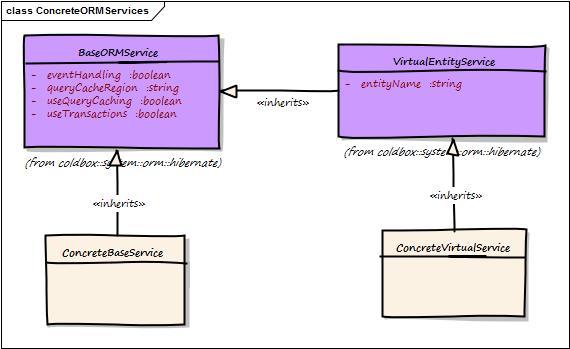
The cborm module will enhance your ORM Entities and ColdBox application by providing you with features in the following areas:
Active Record Pattern
You can extend your entities from our ActiveEntity class and take advantage of both Active Record and Hibernate ORM
Entity Population
Easily populate entities from json, structs, xml, queries and build up even the entity relationships from flat data.
Entity Marshalling to raw data types ()
Easily extract the data from entities and their relationships so you can marshall them to json, xml, etc.
Automatic CRUD Resource Handler
If you extend our cborm.models.resources.BaseHandler it will generate the full CRUD for a specific entity based on ColdBox Resources
ORM Events
Easily listen to multiple ORM events via ColdBox Interceptors
Service Layers
Enhance the ability to list, query, find entities, work with native hibernate constructs and more.
Validation
We provide you with a unique validator to validate against unique columns
Just write your entities and their relationships and we will take care of the rest!
Let's begin our adventure with the BaseORMService model. This model can be injected or requested via WireBox and will be used to interact with any entity in our system or with Hibernate directly:
This service object acts as an abstraction layer to the ColdFusion ORM (Hibernate) and can work with any entity in your system as all methods most likely receive the entityName argument. You will be able to do the following category of actions from this service class:
Hibernate Session utility methods
Entity metadata methods
Querying methods
Criteria Queries or fluent SQL
This means that you don't need to create a service layer CFC in order to work with ORM entities, you can leverage this abstraction to work with your ORM needs. You can also specifically bind (root) the service to a specific entity, which we lovingly call a VirtualEntityService. This way you don't have to be passing the entity names left and right, the virtual entity service will be constructed with the name and all operations will be done upon that entity.
Once you have access to the injected base ORM service, you can use it in all of its glory.
Important Please check out the latest API Docs for the latest methods and functionality:
We also have a virtual service layer that can be mapped to specific entities and create entity driven service layers virtually. Meaning you don't have to be passing any entity names to the API methods to save you precious typing time. This is achieved via the VirtualEntityService model which inherits from the BaseORMService class.
You can achieve this in several manners:
Injection
entityService:{EntityName}
Request via WireBox using the DSL argument of getInstance()
That's it! You can use it just like the BaseORMService except no more passing the entity name.
This is where you create your own CFC that inherits from our VirtualEntityService and either adds or overrides methods. The virtual and base services takes you about 90% of the way. With you concrete services, you can complete the functionality to your liking.
All you need to do is inherit from the cborm.models.VirtualEntityService and call the parent class constructor with the available arguments:
entityname - The name of the entity to root this service with (REQUIRED)
queryCacheRegion - The name of the query cache region if using caching, defaults to #arguments.entityName#.defaultVSCache
useQueryCaching
If you want to apply an Active Record and fluent feel to your entities then ActiveEntity is just for you. Just inherit from cborm.models.ActiveEntity and you are on your way to Active Record bliss.
ActiveEntity inherits from the VirtualEntityService class which inherits from the BaseORMService class. So you have the full gamut of usage plus the ability for the active entity to validate itself. It has the isValid() and getValidationResults() methods to help you with the validation of a populated entity.
If you are creating RESTful services, you can leverage our new Base ORM Handler that will give you a full CRUD service for your entities. All you have to do is the following:
Create your entities
Add mementifier data ()
Add validation data ()
That's it! This handler will now manage ALL the CRUD operations in REST format for your entity including relationships, validations, pagination and data marshalling.
Let's do a basic example of CRUD (Create-Read-Update-Delete). We will generate a ColdBox App, connect it to a database and leverage ActiveEntity for a nice quick CRUD App.
The source code for this full example can be found in Github: or in ForgeBox:
Let's start by creating a ColdBox app and preparing it for usage with ORM:
Season the environment file (.env) with your database credentials and make sure that database exists:
Now open the Application.cfc and let's configure the ORM by adding the following in the pseudo constructor and adding two lines of code to the request start so when we reinit the APP we can also reinit the ORM.
To change the datasource name to something you like then update it here and in the .cfconfig.json file. Once done, issue a server restart and enjoy your new datasource name.
Let's start a server and start enjoying the fruits of our labor:
If you get a Could not instantiate connection provider: org.lucee.extension.orm.hibernate.jdbc.ConnectionProviderImpl error on startup here. It means that you hit the stupid Lucee bug where on first server start the ORM is not fully deployed. Just issue a server restart to resolve this.
Let's start by creating a Person object with a few properties, let's use CommandBox for this and our super duper coldbox create orm-entity command:
This will generate the models/Person.cfc as an ActiveEntity object and even create the unit test for it.
Since we love to promote tests at Ortus, let's configure our test harness for ORM testing. Open the /tests/Application.cfc and add the following code to setup the ORM and some functions for helping us test.
Now that we have prepared the test harness for ORM testing, let's test out our Person with a simple unit test. We don't over test here because our integration test will be more pragmatic and cover our use cases:
We will now generate a handler and do CRUD actions for this Person:
This creates the handlers/persons.cfc with the CRUD actions and a nice index action we will use to present all persons just for fun!
Please note that this also generates the integrations tests as well under /tests/specs/integration/personsTest.cfc
We will get an instance of a Person, populate it with data and save it. We will then return it as a JSON memento. The new() method will allow you to pass a struct of properties and/or relationships to populate the new Person instance with. Then just call the save() operation on the returned object.
You might be asking yourself: Where does this magic getMemento() method come from? Well, it comes from the mementifier module wich inspects ORM entities and injects them with this function to allow you to produce raw state from entities. (Please see: https://forgebox.io/view/mementifier)
We will get an instance according to ID and show it's memento in json. There are many ways in the ORM service and Active Entity to get objects by criteria,
In this example, we use the get() method which retrieves a single entity by identifier. Also note the default value of 0 used as well. This means that if the incoming id is null then pass a 0. The ORM services will detect the 0 and by default give you a new Person object, the call will not fail. If you want your call to fail so you can show a nice exception for invalid identifiers you can use getOrFail() instead.
Now let's retrieve an entity by Id, update it and save it again!
Now let's delete an incoming entity identifier
Note that you have two choices when deleting by identifier:
Get the entity by the ID and then send it to be deleted
Use the deleteById() and pass in the identifier
The latter allows you to bypass any entity loading, and do a pure HQL delete of the entity via it's identifier. The first option is more resource intensive as it has to do a 1+ SQL calls to load the entity and then a final SQL call to delete it.
For extra credit, we will get all instances of Person and render their memento's
That's it! We are now rolling with basic CRUD cborm style!
Here are the full completed BDD tests as well
# Create folder
mkdir myapp --cd
# Scaffold App
coldbox create app
# Install cborm, dotenv, and cfconfig so we can get the CFML engine talking to the DB fast.
install cborm,commandbox-dotenv,commandbox-cfconfig
# Update the .env file
cp .env.example .env# ColdBox Environment
APPNAME=ColdBox
ENVIRONMENT=development
# Database Information
DB_CONNECTIONSTRING=jdbc:mysql://127.0.0.1:3306/cborm?useSSL=false&useUnicode=true&characterEncoding=UTF-8&serverTimezone=UTC&useLegacyDatetimeCode=true
DB_CLASS=com.mysql.jdbc.Driver
DB_DRIVER=MySQL
DB_HOST=127.0.0.1
DB_PORT=3306
DB_DATABASE=cborm
DB_USER=root
DB_PASSWORD=cborm
# S3 Information
S3_ACCESS_KEY=
S3_SECRET_KEY=
S3_REGION=us-east-1
S3_DOMAIN=amazonaws.com// Locate the cborm module for events
this.mappings[ "/cborm" ] = COLDBOX_APP_ROOT_PATH & "modules/cborm";
// The default dsn name in the ColdBox scaffold
this.datasource = "coldbox";
// ORM Settings + Datasource
this.ormEnabled = "true";
this.ormSettings = {
cfclocation = [ "models" ], // Where our entities exist
logSQL = true, // Remove after development to false.
dbcreate = "update", // Generate our DB
automanageSession = false, // Let cborm manage it
flushAtRequestEnd = false, // Never do this! Let cborm manage it
eventhandling = true, // Enable events
eventHandler = "cborm.models.EventHandler", // Who handles the events
skipcfcWithError = true // Yes, because we must work in all CFML engines
};
// request start
public boolean function onRequestStart( string targetPage ){
// If we reinit our app, reinit the ORM too
if( application.cbBootstrap.isFWReinit() )
ormReload();
// Process ColdBox Request
application.cbBootstrap.onRequestStart( arguments.targetPage );
return true;
}# Start a default Lucee Server
server startcoldbox create orm-entity
entityName="Person"
activeEntity=true
properties=name,age:integer,lastVisit:timestamp/**
* A cool Person entity
*/
component persistent="true" table="Person" extends="cborm.models.ActiveEntity"{
// Primary Key
property name="id" fieldtype="id" column="id" generator="native" setter="false";
// Properties
property name="name" ormtype="string";
property name="age" ormtype="numeric";
property name="lastVisit" ormtype="timestamp";
// Validation
this.constraints = {
// Example: age = { required=true, min="18", type="numeric" }
};
// Constructor
function init(){
super.init( useQueryCaching="false" );
return this;
}
} // Locate the cborm module for events
this.mappings[ "/cborm" ] = rootPath & "modules/cborm";
// ORM Settings + Datasource
this.datasource = "coldbox"; // The default dsn name in the ColdBox scaffold
this.ormEnabled = "true";
this.ormSettings = {
cfclocation = [ "models" ], // Where our entities exist
logSQL = true, // Remove after development to false.
dbcreate = "update", // Generate our DB
automanageSession = false, // Let cborm manage it
flushAtRequestEnd = false, // Never do this! Let cborm manage it
eventhandling = true, // Enable events
eventHandler = "cborm.models.EventHandler", // Who handles the events
skipcfcWithError = true // Yes, because we must work in all CFML engines
};
public boolean function onRequestStart( string targetPage ){
ormReload();
return true;
}component extends="coldbox.system.testing.BaseTestCase"{
function run(){
describe( "Person", function(){
it( "can be created", function(){
expect( getInstance( "Person" ) ).toBeComponent()
});
});
}
}coldbox create handler
name="persons"
actions="index,create,show,update,delete"
views=false/**
* create a person
*/
function create( event, rc, prc ){
prc.person = getInstance( "Person" )
.new( {
name : "Luis",
age : 40,
lastVisit : now()
} )
.save();
return prc.person.getMemento( includes="id" );
}/**
* show a person
*/
function show( event, rc, prc ){
return getInstance( "Person" )
.get( rc.id ?: 0 )
.getMemento( includes="id" );
}/**
* show a person
*/
function show( event, rc, prc ){
return getInstance( "Person" )
.getOrFail( rc.id ?: -1 )
.getMemento( includes="id" );
}/**
* Update a person
*/
function update( event, rc, prc ){
prc.person = getInstance( "Person" )
.getOrFail( rc.id ?: -1 )
.setName( "Bob" )
.save();
return prc.person.getMemento( includes="id" );
}/**
* Delete a Person
*/
function delete( event, rc, prc ){
try{
getInstance( "Person" )
.getOrFail( rc.id ?: '' )
.delete();
// Or use the shorthnd notation which is faster
// getIntance( "Person" ).deleteById( rc.id ?: '' )
} catch( any e ){
return "Error deleting entity: #e.message# #e.detail#";
}
return "Entity Deleted!";
}/**
* List all Persons
*/
function index( event, rc, prc ){
return getInstance( "Person" )
// List all as array of objects
.list( asQuery=false )
// Map the entities to mementos
.map( function( item ){
return item.getMemento( includes="id" );
} );
}component extends="coldbox.system.testing.BaseTestCase" appMapping="/"{
function run(){
describe( "persons Suite", function(){
aroundEach( function( spec ) {
setup();
transaction{
try{
arguments.spec.body();
} catch( any e ){
rethrow;
} finally{
transactionRollback();
}
}
});
it( "index", function(){
var event = this.GET( "persons.index" );
// expectations go here.
expect( event.getRenderedContent() ).toBeJSON();
});
it( "create", function(){
var event = this.POST(
"persons.create"
);
// expectations go here.
var person = event.getPrivateValue( "Person" );
expect( person ).toBeComponent();
expect( person.getId() ).notToBeNull();
});
it( "show", function(){
// Create mock
var event = this.POST(
"persons.create"
);
// Retrieve it
var event = this.GET(
"persons.show", {
id : event.getPrivateValue( "Person" ).getId()
}
);
// expectations go here.
var person = event.getPrivateValue( "Person" );
expect( person ).toBeComponent();
expect( person.getId() ).notToBeNull();
});
it( "update", function(){
// Create mock
var event = this.POST(
"persons.create"
);
var event = this.POST(
"persons.update", {
id : event.getPrivateValue( "Person" ).getId()
}
);
// expectations go here.
var person = event.getPrivateValue( "Person" );
expect( person ).toBeComponent();
expect( person.getId() ).notToBeNull();
expect( person.getName() ).toBe( "Bob" );
});
it( "delete", function(){
// Create mock
var event = this.POST(
"persons.create"
);
// Create mock
var event = this.DELETE(
"persons.delete", {
id : event.getPrivateValue( "Person" ).getId()
}
);
expect( event.getRenderedContent() ).toInclude( "Entity Deleted" );
});
});
}
}
Getters
Finders
Dynamic Finders
Counters
Dynamic Counters
Persistence (save,update,delete) and bulk persistence with transactions
Eviction Methods
Population Methods
getInstance( dsl = entityService:{EntityName} );
Request via a Base ORM Service
createService()
eventHandling - Activate event handling, defaults to true
useTransactions - Activate transaction blocks on calls, defaults to true
defaultAsQuery - Return query or array of objects on list(), executeQuery(), criteriaQuery(), defaults to true
datasource - The datasource name to be used for the rooted entity, if not we use the default datasource
resources( "users" )
Create the handler that will manage that resource and extend our base handler, spice up as needed and you are done:
// inject via dsl
property name="ormService" inject="entityService";
// inject via alias
property name="ormService" inject="baseORMService@cborm";

// use via alias
getInstance( "BaseORMService@cborm" );
// use via dsl
getInstance( dsl="entityService" );component{
inject name="ormService" inject="entityService";
function saveUser( event, rc, prc ){
// retrieve and populate a new user object
var user = populateModel( ormService.new( "User" ) );
// save the entity using hibernate transactions
ormService.save( user );
relocate( "user.list" );
}
function list( event, rc, prc ){
// get a listing of all users with pagination and filtering
prc.users = ormService.list(
entityName = "User",
criteria = { isActive : true },
sortOrder = "fname",
offset = event.getValue( "startrow", 1 ),
max = 20
);
event.setView( "user/list" );
}
// Dynamic Finders
function findUsers( event, rc, prc ){
prc.data = ormService.findByRoleAndIsActive( "User", "Admin", true );
}
// Fluent Criteria Queries
function searchContent( event, rc, prc ){
prc.dataStream = ormService
.newCriteria( "Content" )
.isEq( "published", rc.isPublished )
.isLt( "publishedDate", now() )
.or(
ormService.getRestrictions().isNull( "expireDate" ),
ormService.getRestrictions().isGT( "expireDate", now() )
)
.isEq( "passwordProtection", "" )
.joinTo( "activeContent", "ac" )
.like( "title", "%#rc.searchTerm#%" )
.asStream()
.list( offset=rc.offset, max=50 );
event.setView( "content/search")
}
}// Injection
property name="userService" inject="entityService:User"
// Request it
contentService = getInstance( dsl = "entityService:Content" );
// Via ORM Service
ormService.createService( entityName="Content", useQueryCaching=true );component{
inject name="userService" inject="entityService:User";
function saveUser( event, rc, prc ){
// retrieve and populate a new user object
var user = populateModel( userService.new() );
// save the entity using hibernate transactions
userService.save( user );
relocate( "user.list" );
}
function list( event, rc, prc ){
// get a listing of all users with pagination and filtering
prc.users = userService.list(
criteria = { isActive : true },
sortOrder = "fname",
offset = event.getValue( "startrow", 1 ),
max = 20
);
event.setView( "user/list" );
}
// Dynamic Finders
function findUsers( event, rc, prc ){
prc.data = userService.findByRoleAndIsActive( "Admin", true );
}
// Criteria Queries
function searchContent( event, rc, prc ){
prc.dataStream = userService
.newCriteria()
.isEq( "published", rc.isPublished )
.isLt( "publishedDate", now() )
.or(
ormService.getRestrictions().isNull( "expireDate" ),
ormService.getRestrictions().isGT( "expireDate", now() )
)
.isEq( "passwordProtection", "" )
.joinTo( "activeContent", "ac" )
.like( "title", "%#rc.searchTerm#%" )
.asStream()
.list( offset=rc.offset, max=50 );
event.setView( "content/search")
}
}component extends="cborm.models.VirtualEntityService" singleton{
/**
* Constructor
* @entityName The content entity name to bind this service to.
*/
ContentService function init( entityName="cbContent" ){
// init it
super.init( entityName=arguments.entityName, useQueryCaching=true );
return this;
}
}component persistent="true" table="users" extends="cborm.models.ActiveEntity"{
property name="id" column="user_id" fieldType="id" generator="uuid";
/**
* @display First Name
* @message Please provide firstname
* @NotEmpty
*/
property name="firstName";
/**
* @display Last Name
* @message Please provide lastname
* @NotEmpty
*/
property name="lastName";
property name="userName";
property name="password";
property name="lastLogin" ormtype="date";
// M20 -> Role
property name="role" cfc="Role" fieldtype="many-to-one" fkcolumn="FKRoleID" lazy="true" notnull="false";
// DI Test
property name="wirebox" inject="wirebox" persistent="false";
// Constraints
this.constraints = {
firstName = { required=true },
lastName = { required=true },
username = { required=true, min=5, validator="UniqueValidator@cborm" },
password = { required=true, min=6 }
};
}user = entityNew( "User" ).get( 2 );
var isValid = entityNew( "User" )
.populate( memento=rc, composeRelationships=true )
.isValid();
user = entityNew( "User" ).findAllByIsActive( true );
user = entityNew( "User" )
.get( 4 )
.setName( "Awesome" )
.save();
entityNew( "User" )
.getOrFail( 4 )
.delete();
prc.users = entityNew( "User" )
.findAllWhere(
criteria = { isActive:true, role:entityNew( "Role" ).findByName( "Admin" ) },
stream = true
);/**
* My awesome cb6 resources handler
*/
component extends="cborm.models.resources.BaseHandler"{
// Inject the correct service as the `ormService` for the resource Handler
property name="ormService" inject="entityService:Role";
// The default sorting order string: permission, name, data desc, etc.
variables.sortOrder = "name";
// The name of the entity this resource handler controls. Singular name please.
variables.entity = "Role";
}